Subscription Dunning — Knowledge Base
Last updated: April 23, 2026
What is Reviver? Reviver is FanBasis's built-in subscription recovery tool. When a customer's payment fails, Reviver automatically retries the charge and sends dunning emails to recover the subscription — without any manual work on your end.
Why it matters: Failed payments cost subscription businesses an average of ~10% of ARR annually. With smart retries + dunning emails, up to 70–80% of those failures are recoverable. Without a tool like Reviver, the natural recovery rate is only 10–25%.
Turning On Reviver
Contact your Account Manager or Client Success team to have this option enabled. Once enabled, then you will be able to toggle it on. Follow the steps below to toggle it on:
Go to Customers → Subscriptions → Subscription Settings
Toggle Reviver to On
Once enabled, three new tabs will appear: Reports, Analytics, and Email Templates
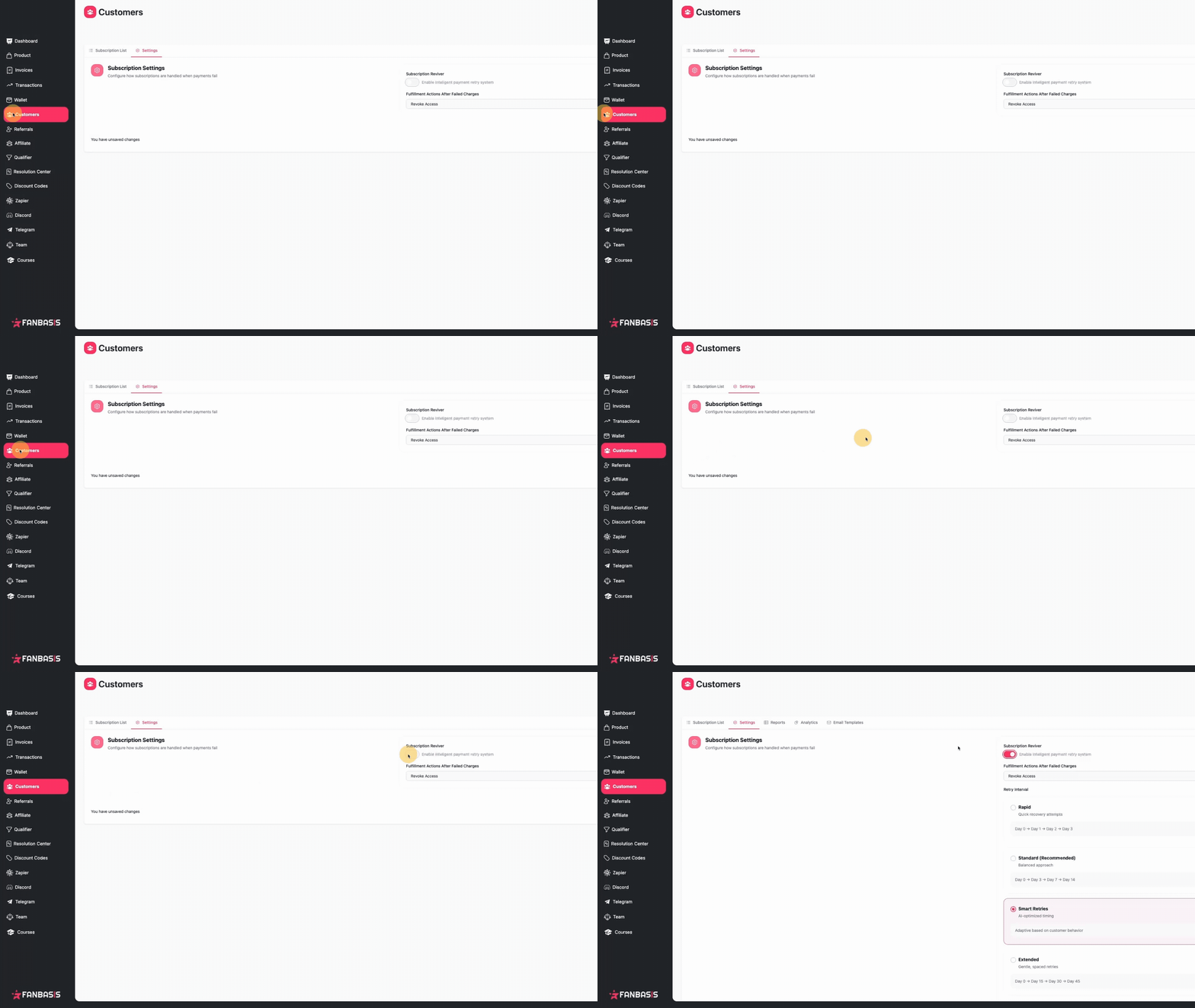
After enabling, configure three things before you're live:
Retry interval preset — how often failed payments are retried
Fulfillment action — what happens to customer access during recovery
Email templates — customize the dunning emails your customers receive
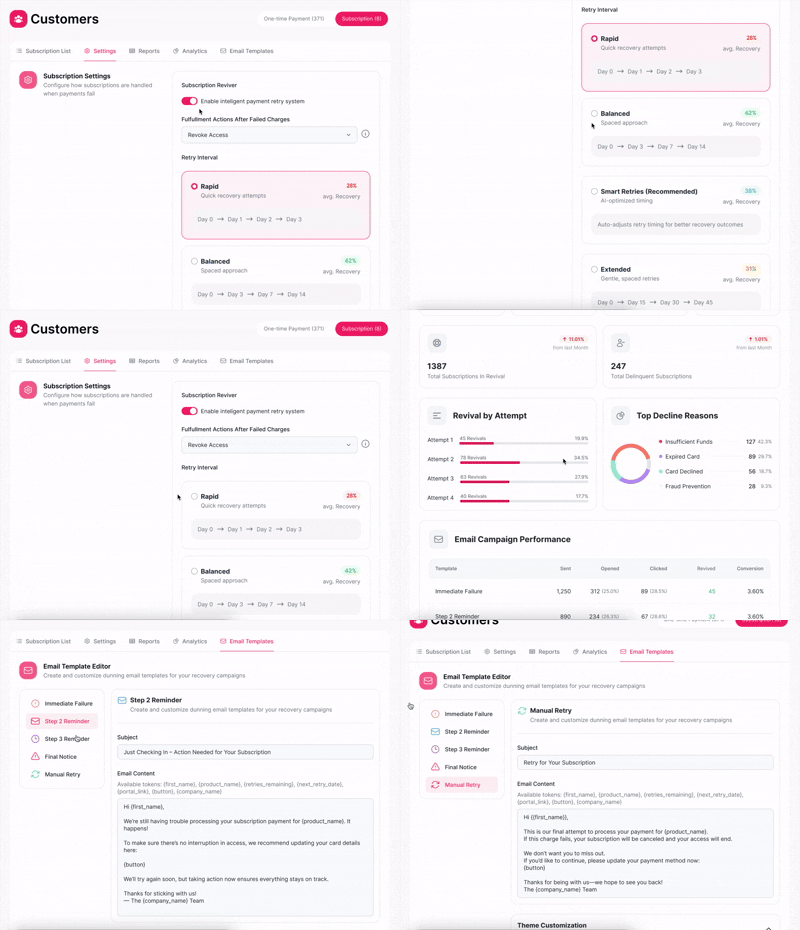
Retry Presets
Reviver offers four retry schedules:
Preset | Cadence |
Rapid | Retries daily |
Standard | Retries at 3, 4, and 7 days after failure |
Smart Retries (default) | Auto-selects timing based on subscription frequency |
Extended | Retries at 15, 30, and 45 days |
You can also set per-product overrides in Subscription Settings to assign different presets to specific products.
Changes to your preset only apply to new failures — subscriptions already in recovery continue on their original schedule.
Fulfillment Actions
When a payment fails, choose what happens to the customer's access:
Revoke access — remove immediately
Maintain access — keep active during recovery (recommended to reduce support requests)
Follow Reviver schedule — manage access based on the recovery timeline
Retry Attempts & Limits
Reviver allows up to 5 total attempts per failed subscription:
3 automated retries
2 manual retries
This limit protects your payment authorization rates and aligns with card network best practices. You can view how the status and how many attempts have been done by going to your reports tab and clicking on the action button on the right of the customer.
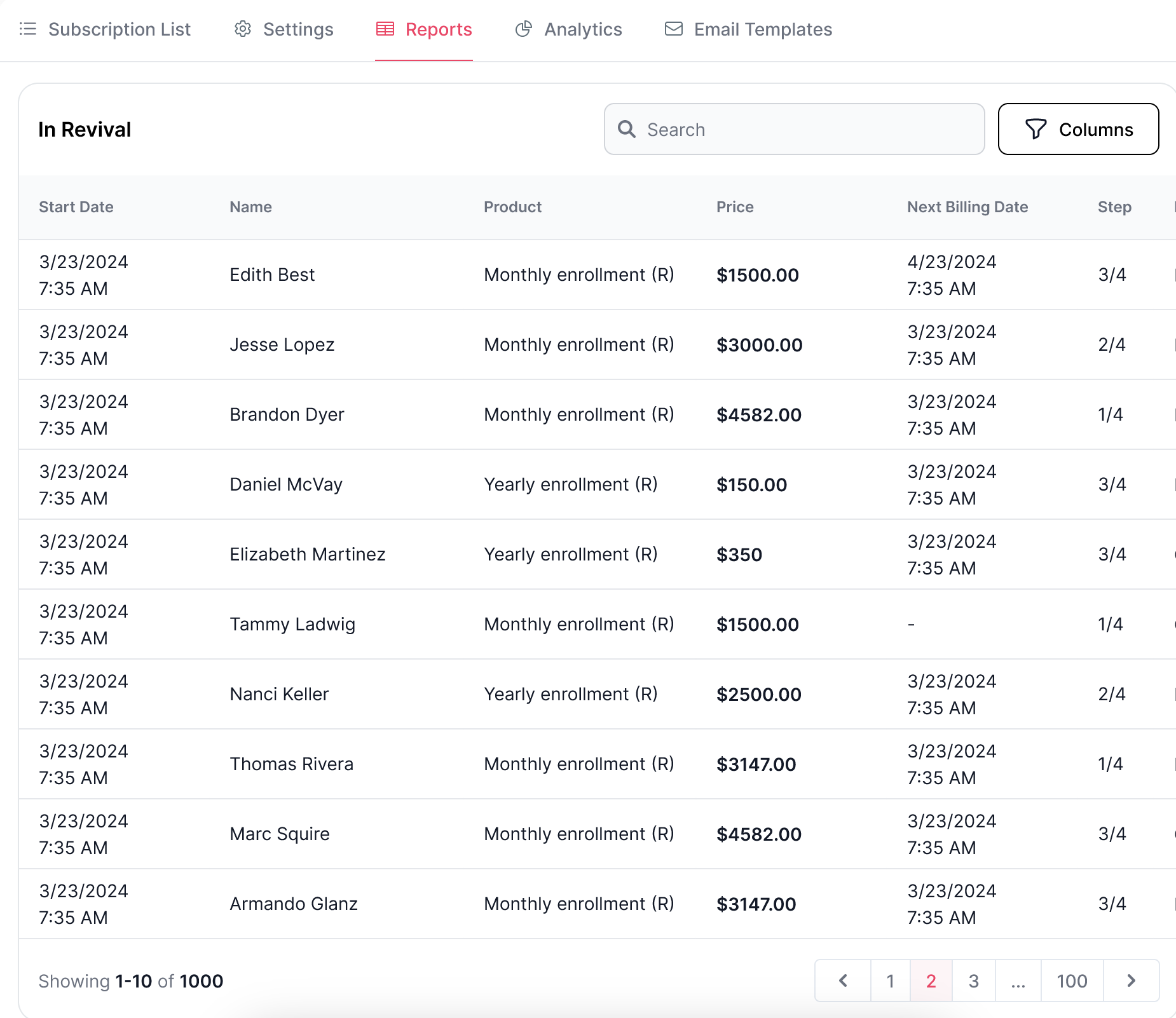
To manually retry a payment: Find the past-due subscription in your Subscriptions list → click the retry action → confirm in the modal (shows customer name, amount, attempts remaining, and days past due).
You can also use Retry All Past Due to bulk-retry multiple subscriptions at once.
If a subscription shows a hard decline (card lost, stolen, or account closed), the retry button will be disabled. The customer must update their payment method before a retry can succeed.
Dunning Emails
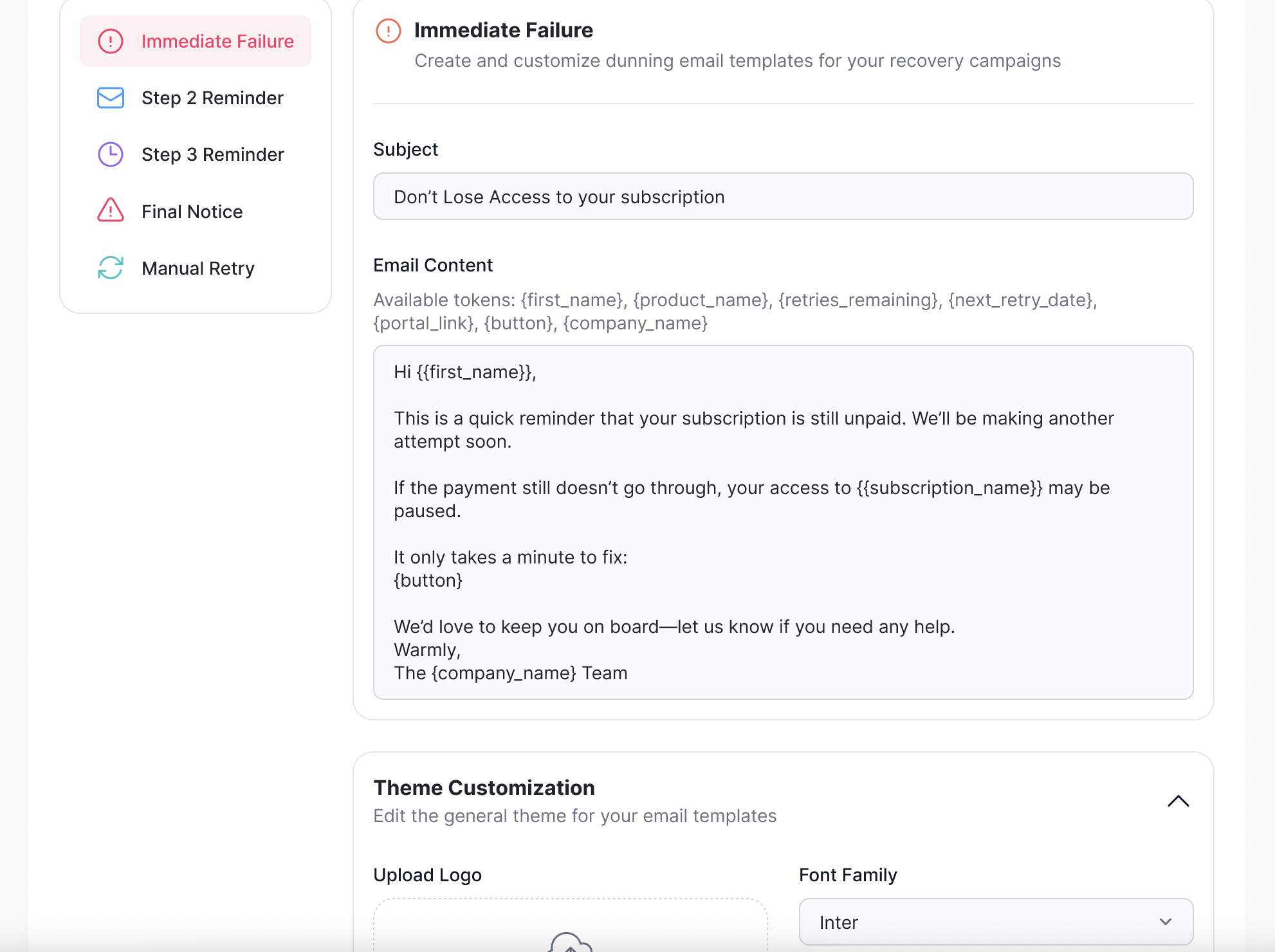
Reviver sends up to 5 emails throughout the recovery process:
Template | When It Sends |
Immediate Failure | Payment first fails |
Step 2 Reminder | Second retry attempt |
Step 3 Reminder | Third retry attempt |
Final Notice | Last automated attempt |
Manual Retry | When you manually trigger a retry |
To customize emails: Go to the Email Templates tab → edit any template → use Test Send to preview in your inbox.
You can also upload a logo, choose from 10 fonts, and customize button colors to match your brand.
Subscription Statuses
Status | What It Means |
Past Due | Renewal payment failed — subscription is in recovery |
Negative "Days Until Renewal" | How many days overdue (e.g. "-5 days" = failed 5 days ago) |
Delinquent | All retry attempts exhausted — subscription not recovered |
Reports & Analytics
Reports tab shows two views:
In Revival — subscriptions currently being retried
Delinquent — subscriptions that exhausted all attempts
Analytics tab tracks:
Total revenue revived, revival rate, avg time to recovery
Revival by attempt (which retry is most effective)
Top decline reasons
Email performance (sent, opened, clicked, recovered)
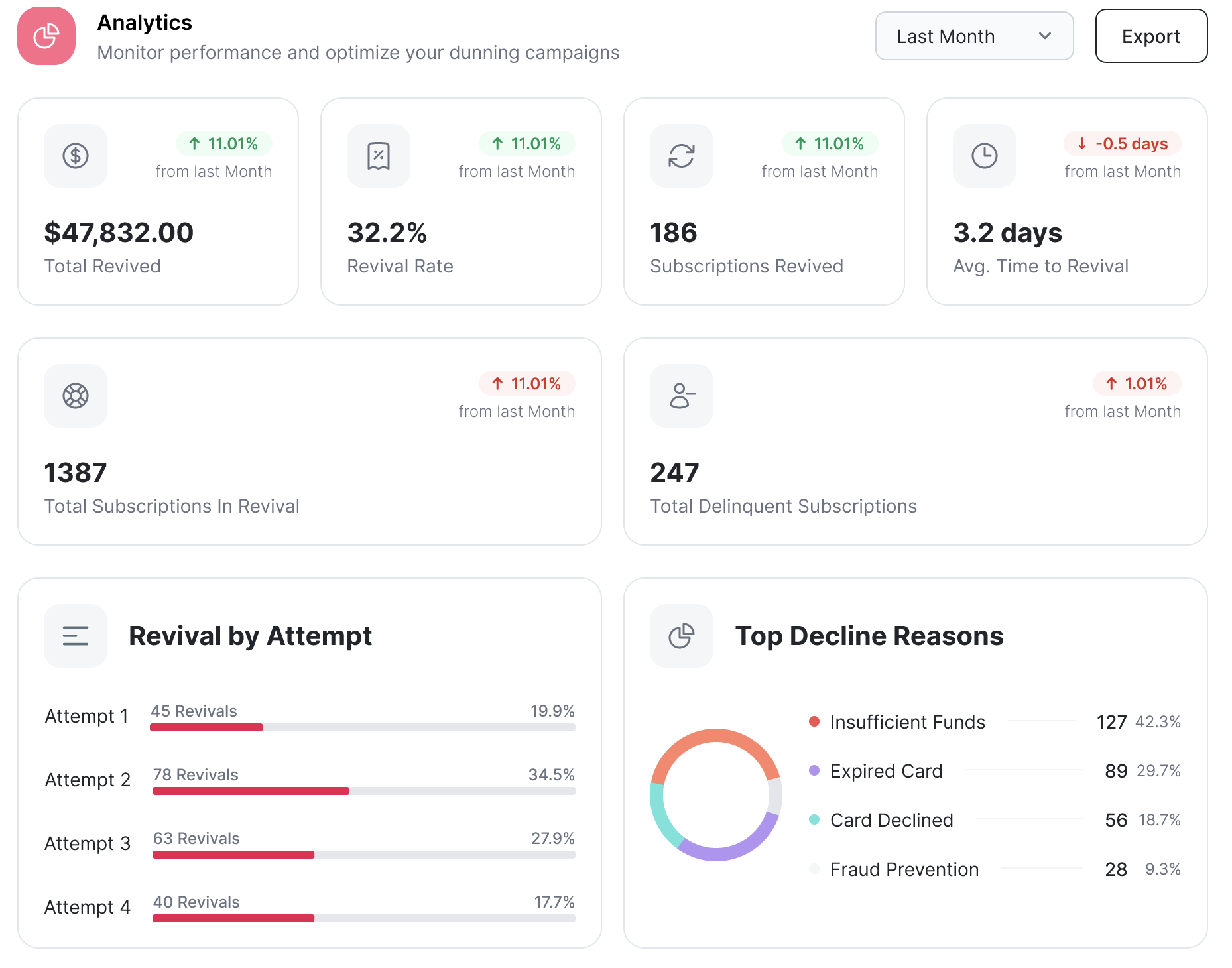
You can filter by date range and export as CSV.
Billing and Win Fee
When Reviver successfully recovers a failed payment, FanBasis charges a Win Fee on the recovered amount (calculated on the product price, not including other platform fees).
The fee is applied only on successful recovery
It cannot be refunded if the customer later requests a refund
Win Fee charges appear in your payout reporting
FAQ
Tabs not showing after enabling Reviver?
Make sure the toggle is fully enabled in Subscription Settings, then refresh the page. If the tabs still don’t appear, reach out to support.
Customer updated their card but subscription is still past due?
When a customer updates their payment method, Reviver will automatically attempt to charge the new card. If that charge also fails, the subscription will remain past due — check the latest decline reason in the subscription details.
Analytics showing no data?
Analytics populate as retry attempts occur and recovery outcomes are recorded. If Reviver was just enabled, allow some time for data to appear.
Why is the retry button disabled?
If the last failure was a hard decline (lost/stolen card, closed account), retrying the same card won’t work. The customer needs to update their payment method before another attempt can succeed.
How many retry attempts are allowed?
Reviver allows up to 5 total attempts per failed subscription — 3 automated and 2 manual — to protect authorization rates.