Resolution Center & Disputes
Last updated: September 29, 2025
Getting hit with a dispute can be frustrating — but with the right approach and solid evidence, you've got a real shot at turning it around. This guide walks you through what to include, how to submit it, and what to expect during the process.
How We Help You
Our in-house disputes team is made up of pros who used to work at banks handling the dispute mitigation process. When you submit your evidence:
We also pull all datapoints from the original transaction.
Then, we compile a detailed evidence packet for the bank or financial institution involved to review.
We know exactly what the reviewers look for, and we build the strongest case possible to help you win.
How to Find a Dispute
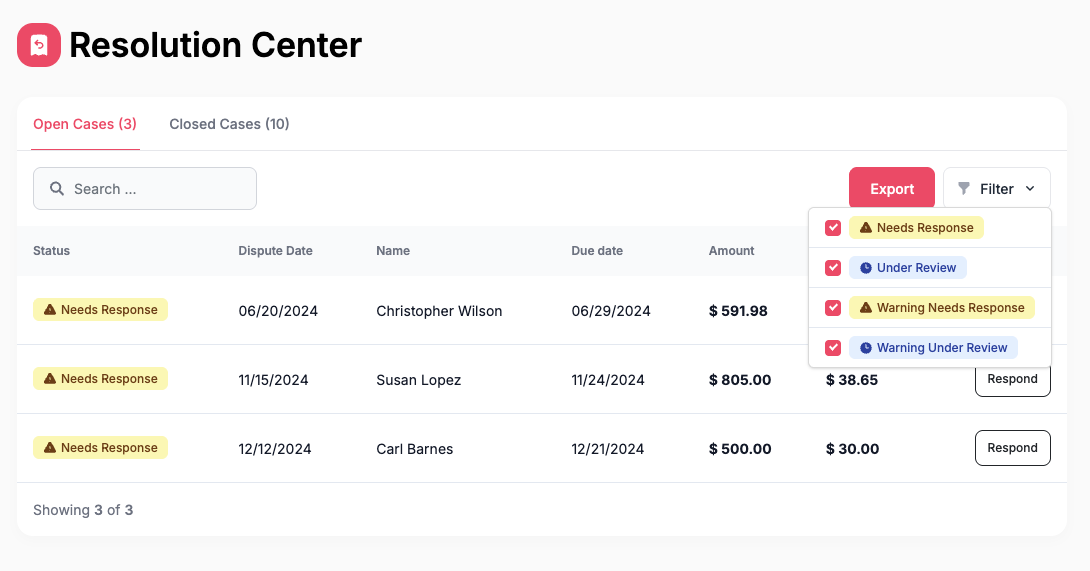
From your Dashboard, select Resolution Center.
Click the “Respond” button next to an Open Case.
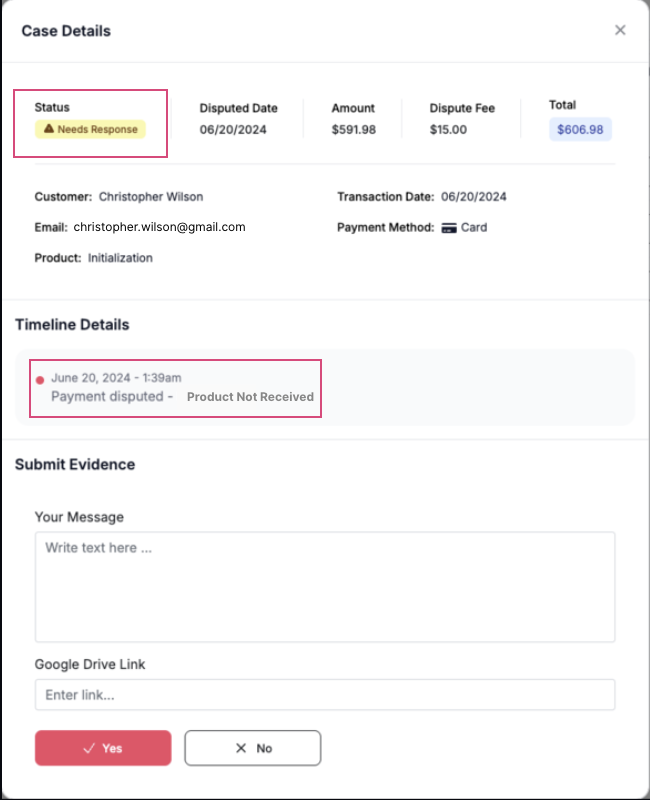
The dispute reason will appear on the timeline details of the case.
What the Statuses Mean
As your dispute moves along, you’ll see different status updates:
Needs Response:
The dispute has not received a submission yet from your business, and requires you to upload additional evidence.
Evidence Submitted:
Your evidence has been submitted to our disputes mitigation team. Our team will use the evidence you submitted, along with 60+ data points that we collect at checkout to form a comprehensive evidence packet to submit to the bank.Under Review:
The evidence has been submitted to the financial institution and we are awaiting their response.Win:
The dispute was resolved in your favor.Loss:
The dispute was resolved in favor of the customer.
Why Do Customers File Disputes?
Here are the most common reasons a dispute might come through:
Credit Not Processed:
They were expecting a refund and didn’t get it.Duplicate Charge:
They think they were charged twice for the same thing.Fraudulent:
They say they didn’t authorize the payment.General Issue:
They say the invoice was wrong or the order seemed risky.Product Not Received:
They say they never got what they paid for.Product Unacceptable:
They weren’t happy with the product or service.Subscription Canceled:
They say they canceled before it renewed.Unrecognized Charge:
They don’t recognize the charge on their statement.
What to Include in Your Evidence
The best way to respond to a dispute is by pulling everything together into one folder. Best practice is to attach all evidence as separate PDFs—this gives our resolutions team the ability to use your evidence to form a comprehensive dispute packet.
Here’s what strong evidence might look like:
Refund Policy: A screenshot of your Terms & Conditions where you explain your refund policy.
Signed Agreements: A contract or signed agreement (if you use one).
Conversations with the Customer: Screenshots of emails, texts, or messages. You can merge these screenshots into a singular PDF.
Proof of Delivery: Anything that shows the customer accessed your service — like login screenshots, course or community access.
Customer Feedback: Positive reviews, surveys, or feedback that show they were happy.
Activity Logs: Login records or completed assignments/homework.
Event Attendance: Webinar registration or attendance tied to their email.
What You’re Trying to Show
Your evidence should prove two key things:
The customer authorized the charge
The customer received and used your product or service
The more evidence you provide, the better! Our team's goal is to help you win the dispute—they will decide what evidence is compelling and what should be included, so best practice is to submit everything you may have on the customer.
Submitting is simple:
Head to the "Open Cases" tab and pick the case you're working on.
Click "Submit Evidence."
Upload your documents to Google Drive.
Make sure the link is set to public/viewable.
Paste that link into the resolution center.
That’s it — we’ll take it from there.
How Long Does It Take?
The timeline for dispute resolution varies depending on the case. When a dispute is filed, funds are initially withdrawn from the wallet and sellers can submit evidence until the specified due date. The final resolution will depend on the specifics of the case and the evidence provided. Once the evidence submitted due date has lapsed the following time frames begin.
Average Platform Response Time
Visa | 14–30 calendar days |
Mastercard | Up to 45 calendar days |
Discover | 14 calendar days |
American Express | 14–30 calendar days |
Cash App | 7–14 calendar days |
Affirm | 45 calendar days |
Klarna | 14–45 calendar days |
Afterpay | 7–14 business days |
Zip & Sezzle | Not always specified |
Who Makes the Final Call?
It’s not us — or even the customer’s bank directly. A neutral third-party reviewer, hired by the bank or payment platform (like Klarna, Afterpay, Zip, etc.), who review all the evidence and makes the final decision on who wins the dispute.
❓My Customer Dropped Their Dispute, But I Still See It in My Resolution Center. What should I do?
If a customer has dropped their dispute and it’s still showing in your resolution center, we recommend that you still submit your evidence. Dispute withdrawals can take some time to process. We recommend submitting any written proof that the customer has formally withdrawn the dispute on their end (i.e. screenshots of communication, an official email from their bank, etc.)